· ReadyStack
Worked example
Real numbers from this tool, line by line.
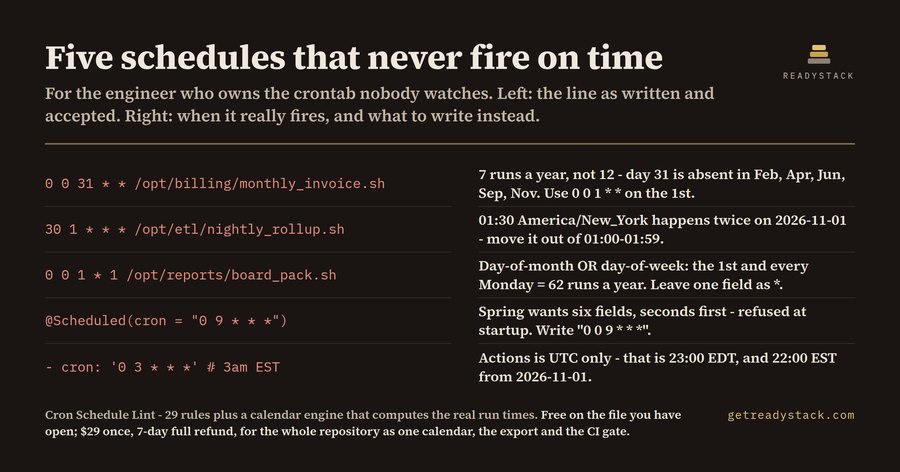
Five schedules that never fire on time: that is what came back from one crontab a platform engineer in Berlin had already reviewed and signed off. crontab -e accepted every line. kubectl apply accepted every line. The workflow file is valid YAML. Nothing errors, nothing alerts, nothing logs - the job simply is not there on the morning somebody goes looking for it.
0 0 31 * *   /opt/billing/monthly_invoice.sh
30 1 * * *   /opt/etl/nightly_rollup.sh
0 0 1 * 1    /opt/reports/board_pack.sh
0 2 * * *    /opt/jobs/reconcile.py
- cron: '0 3 * * *'   # 3am EST
Read line by line, with a calendar and a time zone database instead of a syntax parser:
0 0 31 * *    day 31 never occurs in February, April, June, September or November
              -> 7 runs in the next 365 days, not 12. Five monthly invoice runs are missing.
30 1 * * *    01:30 America/New_York happens TWICE on 2026-11-01
              -> whether it runs once or twice there is implementation-defined.
0 0 1 * 1     day-of-month and day-of-week are BOTH set, so POSIX cron takes the union
              -> the 1st of the month OR every Monday = 62 runs a year, not 12.
0 2 * * *     02:00 America/New_York does not exist at all on 2027-03-14
              -> the clock goes 01:59 -> 03:00. There is no 02:00 to fire at.
0 3 * * *     GitHub Actions runs schedules on UTC only, whatever the comment says
              -> 03:00 UTC is 23:00 EDT today and 22:00 EST from 2026-11-01.
The union rule is in the POSIX specification, and almost nobody knows it
If both the day-of-month and the day-of-week field are restricted, cron fires when either matches - not when both do. Paul Vixie acknowledged the behaviour and declined to change it. So 0 0 1 * 1, which reads like "the first Monday of the month", is really "the first of the month, plus every Monday". Sixty-two board packs a year instead of twelve. In pure POSIX cron the intersection cannot be expressed at all; it has to be a guard inside the command.
The date nobody put in the code
30 1 * * * is a perfectly ordinary nightly rollup. On 2026-11-01 the United States leaves daylight saving time and the clock in America/New_York goes back at 02:00, so 01:00 to 01:59 happens twice that morning. Europe already did it a week earlier, on 2026-10-25. And in the southern hemisphere the sign flips: in Pacific/Auckland the clock jumps forward on 2026-09-27, so a payroll cutoff written for 02:30 has no 02:30 to run at that day.
None of those dates is in the repository. Nobody edited anything. The calendar moved.
Six fields, five fields, and the year
The same five numbers mean different things depending on who reads them.
- Spring
@Scheduledtakes six fields, seconds first. A five-field Unix expression is refused
at startup with Cron expression must consist of 6 fields.
- Quartz also takes six (or seven), and numbers the week 1-7 with 1 = Sunday. A Unix
1
means Monday. Pasted across, the job runs on the wrong day and never complains.
- Amazon EventBridge
cron()takes six fields and the sixth is the year, not seconds - and
it refuses a value or a * in both day-of-month and day-of-week; one of the two must be a ?.
- GitHub Actions, Kubernetes CronJob, Vercel and Cloudflare Workers all take five,
and all four run on UTC with no per-schedule zone (a CronJob can be given spec.timeZone, stable since Kubernetes 1.27; the other three cannot).
Why the assistant cannot see it
An assistant writes a cron expression from the shape of the sentence you gave it. It has no calendar, so it cannot know that day 31 is absent from five months. It has no clock, so it cannot know that the wall time it just wrote occurs twice on a specific Sunday in your zone. And it answers "every Monday the 1st" with 0 0 1 * 1 because that is what the fields look like they say.
Nor does the failure surface later. A Kubernetes CronJob that misses more than 100 start times stops scheduling permanently and logs one line - *Cannot determine if job needs to be started: too many missed start time (> 100)* - with no event and no alert. A scheduled workflow in a public GitHub repository is disabled automatically after 60 days without repository activity; GitHub sends a single email and shows nothing in the Actions tab. A crontab command containing an unescaped % silently loses everything after it, because in a crontab % ends the command.
What a cron monitor does not tell you
A monitor answers a different question. It watches a job it already knows about and tells you, afterwards, that the ping did not arrive. It cannot tell you that the expression you are about to merge has no 30th of February in it. Healthchecks.io Business is $20 every month for 100 jobs - $240 a year, forever - and it still only speaks after the run was already missed.
What it is
A VS Code and Open VSX extension, and a free one-page web version that runs the identical 29 rules and the identical calendar engine. Open a crontab, a CronJob, a workflow file, a wrangler.toml, a vercel.json, a systemd timer, a beat schedule or a @Scheduled annotation, and every schedule line comes back with the next three instants it really fires at, how many times it fires in a year, and the exact dates when that wall-clock time does not exist or happens twice.
Checking the file you have open is free and complete - all 29 rules, no key, no limit, no watermark, nothing behind a signup. The licence covers a different job: every schedule in the repository merged into one calendar, that calendar exported as CSV, JSON or HTML for a change review, and machine output that exits non-zero so a pipeline can stop a merge that adds a schedule which never fires. $29 once, one licence key per person or team seat, 7-day full refund.
15 seconds — what it actually does
Questions people ask
What does Cron Schedule Lint actually do?
It reads the crontab, Kubernetes CronJob, GitHub Actions workflow, Spring annotation, wrangler.toml or systemd timer you have open and, for every schedule line, prints the next three instants it really fires at, how many times it fires in a year, and the exact dates when that wall-clock time does not exist or happens twice. Twenty-nine rules ship with it.
Who is this for?
Backend, platform and SRE engineers who own the schedules nobody watches: the monthly invoice run, the nightly rollup, the export a finance team waits for. It is aimed at the person reviewing a schedule an assistant generated, who will be asked three weeks later why November's invoices never went out.
Why can I not just check the expression on a cron explainer site?
Because a syntax explainer holds no calendar and no time zone. It cannot tell you that 0 0 31 * * skips five months of every year, that 01:30 in America/New_York happens twice on 2026-11-01, or that 02:30 in Pacific/Auckland does not exist at all on 2026-09-27. Those answers need the time zone database, not a parser.
What is free and what needs a licence key?
Checking the file you have open is free and complete: all twenty-nine rules run, every schedule gets its real run times and its transition dates, and nothing is hidden, watermarked or time-limited. The licence covers a different job - every schedule in the repository merged into one calendar, a CSV, JSON or HTML export, and machine output a CI step can fail on.
How does $29 compare with a cron monitor?
The extension is 29 US dollars once,. Healthchecks.io Business, the ordinary cron monitor, is $20 every month for 100 jobs, which is $240 a year, forever - and by design it can only alert you after a run was already missed. This one answers before the schedule ships.
Why not just ask ChatGPT or another AI chat?
A general AI chat answers from training data with a cutoff date, cannot read your repository and names no rule version. Crontab Lint - cron expression checker (crontab, K8s CronJob checks the file you open against 29 rules from a rule set dated 2026-09-20, and points at the exact line. For a filing, an audit or a client you need that dated result on your own files.
Ask about this tool
One question, answered by the person who built it. Your email only if you want the answer sent.